- function PicPath(uipath)
- -- 遍历路径获取图片信息
- local p = exec(string.format("ls %s",uipath))
- if p ~= nil then
-
- io.output("/mnt/sdcard/test.txt")
- io.write(tostring(p))
- io.close()
-
- end
-
-
- end
- function GetPicpath(path)
- -- 打开创建filepath.txt文件 写入 test.txt文件的内容 并返回字符串数据
- local pathtable = {}
-
- io.output("/mnt/sdcard/filepath.txt") -- 创建filepath 保存拼接好的路径
- for line in io.lines("/mnt/sdcard/test.txt") do -- 打开test文件 遍历文件名 进行拼接
- str = path.."/"..line
- io.write(tostring(str..'\n'))
-
- table.insert(pathtable,str)
- end
-
- io.input("/mnt/sdcard/filepath.txt") -- 打开filepath.txt文件读取路径字符串 并返回
-
- ReadContent = io.read("*a")
- io.close()
-
- return pathtable
-
- end
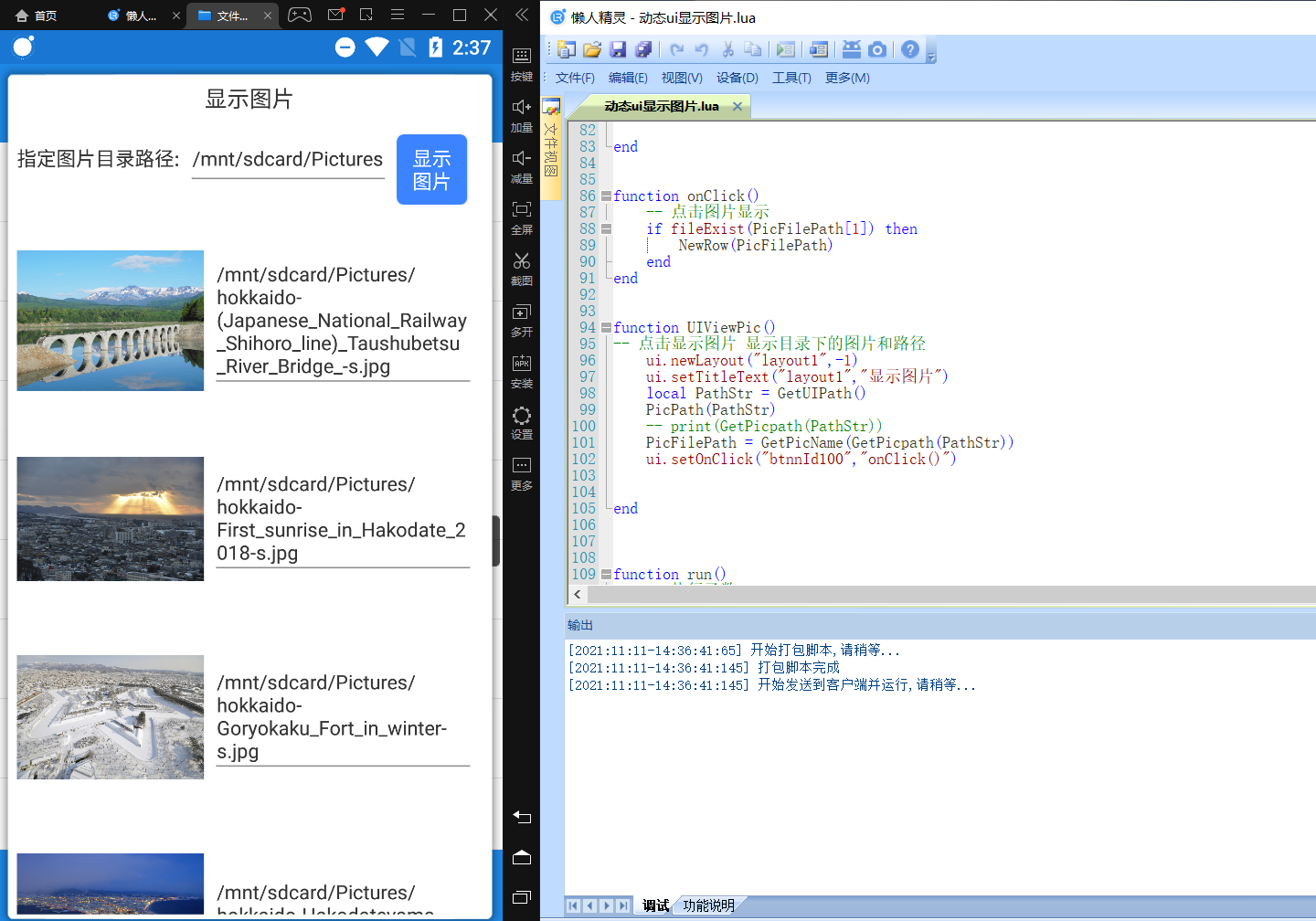
- function GetUIPath()
- -- 填写图片文件夹路径
- ui.newRow("layout1","row100")
- ui.addTextView("layout1","tvId100","指定图片目录路径:")
- ui.addEditText("layout1","editId100","/mnt/sdcard/Pictures")
- ui.addButton("layout1","btnnId100","显示\n图片",150,150)
- ui.setGravity("editId100",48)
- ui.setGravity("tvId100",48)
- ui.setGravity("btnnId100",48)
-
-
-
- return ui.getText("editId100")
- end
- function GetPicName(tab)
- -- 获取图片文件名 如果是以jpg png bmp 后缀名结尾的图片添加到PicFilePath表里面
- local PicFilePath = {}
- for k,v in pairs(tab) do
- if string.find(v, ".jpg", 1) or string.find(v, ".png", 1) or string.find(v, ".bmp", 1)then
-
- table.insert(PicFilePath,v)
- end
-
- end
- return PicFilePath
- end
- function NewRow(tab)
- -- 根据 PicFilePath 表里面的图片创建对应的 动态ui控件
- ui.newRow("layout1","row0",-1,-1)
- btTab = {}
- for k,v in pairs(tab) do
-
- ui.newRow("layout1",string.format("row%s",k),-2,-2)
- ui.addImageView("layout1",string.format("imgId%s",k),v,400,400)
- -- ui.addButton("layout1",string.format("btnnId%s",k),v)
- ui.addEditText("layout1",string.format("btnnId%s",k),v)
- ui.setGravity(string.format("imgId%s",k),3)
-
- end
-
- end
- function onClick()
- -- 点击图片显示
- if fileExist(PicFilePath[1]) then
- NewRow(PicFilePath)
- end
- end
- function UIViewPic()
- -- 点击显示图片 显示目录下的图片和路径
- ui.newLayout("layout1",-1)
- ui.setTitleText("layout1","显示图片")
- local PathStr = GetUIPath()
- PicPath(PathStr)
- -- print(GetPicpath(PathStr))
- PicFilePath = GetPicName(GetPicpath(PathStr))
- ui.setOnClick("btnnId100","onClick()")
-
-
- end
- function run()
- -- 执行函数
- UIViewPic()
- ui.show("layout1",false)
- sleep(100000)
- end
- run()
|





 还不错
还不错

